
Download 11view – Free Image Viewer for Windows
Overview
11view is a lightweight, free image viewer designed specifically for Windows users who need a fast, reliable way to browse photos, graphics, and screenshots without the bloat of full‑featured editors. First introduced in the early 2000s, 11view has evolved into a solid utility that still runs smoothly on legacy systems such as Windows 95, 98, and XP while also being perfectly compatible with modern Windows 10 and 11 environments. The program’s core strength lies in its loading‑time interpolation engine, which quickly renders high‑resolution pictures with minimal delay, making it ideal for photographers, designers, and casual users alike.
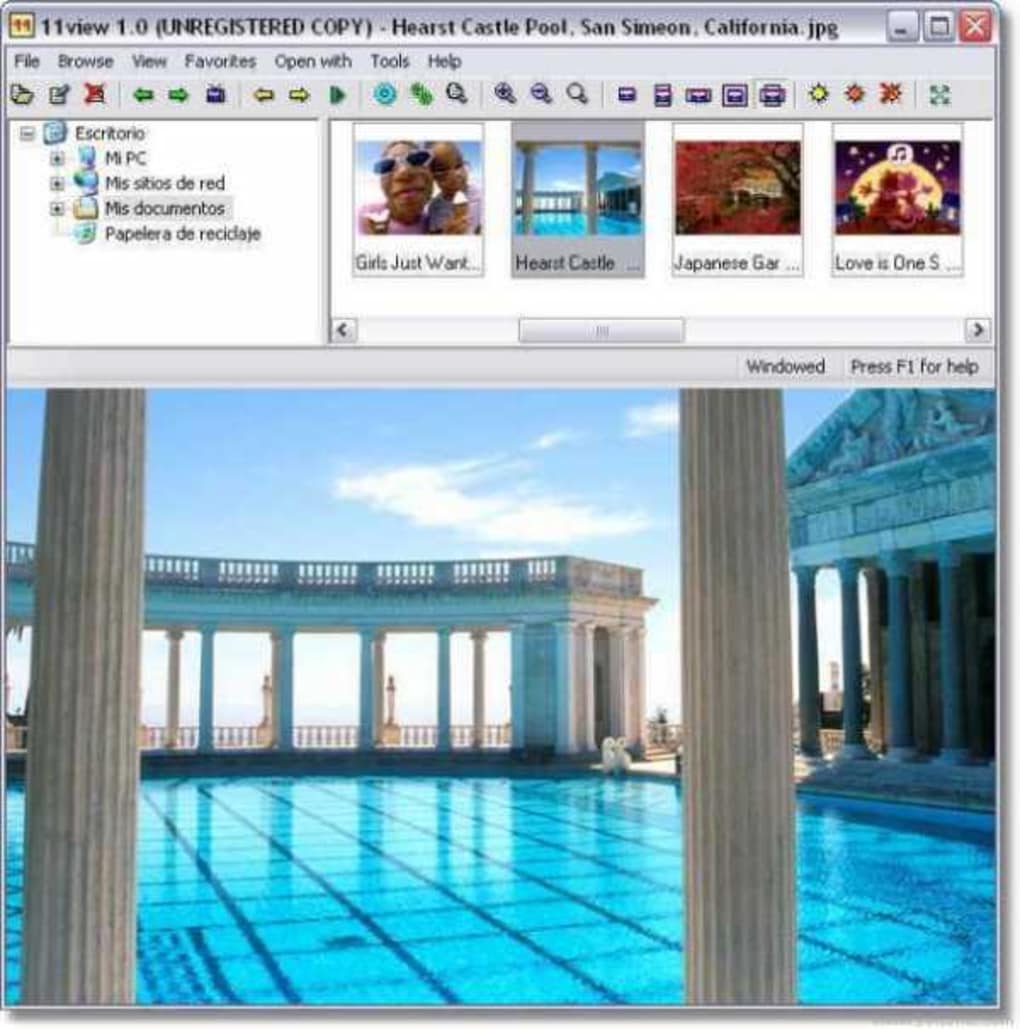
Because the software occupies only a few megabytes of disk space, it does not demand the storage or RAM that many contemporary viewers require. The user interface follows a classic Windows layout: a thumbnail pane on the left, a main preview area on the right, and a toolbar that houses zoom, rotate, and basic editing functions. While 11view does not replace professional editors like Adobe Photoshop, it offers essential tools such as image rotation, basic colour correction, and a slideshow mode that can be set to random or sequential order.
The application is completely free, and its English language pack is included out of the box. Since its addition to the software catalog in 2004, 11view has amassed over 2,400 downloads and continues to see modest weekly installations, proving that a well‑crafted viewer still has a place in a world dominated by cloud‑based galleries.
Key Features that Set 11view Apart
- Loading‑time interpolation: Accelerates rendering of large images, delivering a near‑instant preview even on older hardware.
- Thumbnail navigation: Auto‑generates high‑quality thumbnails for quick browsing of entire folders.
- Basic editing tools: Includes rotate, flip, brightness/contrast adjustment, and colour balance without leaving the viewer.
- Slideshow mode: Configurable timing, transition effects, and full‑screen display for presentations or personal enjoyment.
- File format support: Reads JPEG, PNG, BMP, GIF, TIFF, and several RAW formats, ensuring broad compatibility with most image sources.
- Lightweight footprint: Installation size under 5 MB and minimal RAM usage, perfect for legacy machines.
- Multilingual interface: English is bundled by default, with community‑created language packs available for additional locales.
- Secure and ad‑free: No bundled toolbars, spyware, or unwanted advertisements – a truly clean download.
Beyond the listed features, 11view’s architecture is built on a stable Win32 API, which guarantees that the program remains stable across a wide range of Windows versions. The viewer also supports drag‑and‑drop from Windows Explorer, allowing users to open images with a simple mouse gesture. For power users, the preferences panel offers options to customize thumbnail size, default zoom level, and the behaviour of the mouse wheel. Although the software does not include advanced batch processing, its simplicity makes it an excellent companion to more robust editors: open an image in 11view for a quick glance, then launch Photoshop or GIMP for detailed work. The combination of speed, minimalism, and essential editing functions has earned 11view a loyal following among graphic designers who need a dependable preview tool that won’t hog system resources.
Installation, Usage & Compatibility
Step‑by‑Step Installation
Downloading and installing 11view is straightforward. Follow these steps to get the viewer up and running on your Windows PC:
- Visit the official download page and click the “Download 11view” button. The installer is a small
.exefile (approximately 4 MB). - When prompted by Windows User Account Control, confirm that you want to allow the installer to make changes.
- Run the installer and accept the End‑User License Agreement.
- Choose the destination folder (the default path works for most users) and click “Install”.
- Once installation completes, you can launch 11view from the Start menu or by double‑clicking the desktop shortcut.
First‑Run Experience
Upon opening 11view for the first time, you’ll be greeted with a clean window split into two panes. The left pane displays a navigable folder tree; simply browse to the directory containing your images. The right pane shows a larger preview of the selected file.
The toolbar at the top provides quick access to zoom, rotate, slideshow, and basic colour adjustments. To start a slideshow, select a folder, click the “Slideshow” button, and configure the interval and transition style in the dialog that appears. For quick edits, use the “Edit” dropdown to adjust brightness or rotate the image 90 degrees clockwise or counter‑clockwise.
System Requirements and Operating System Support
11view runs on Windows 95, 98, ME, 2000, XP, Vista, 7, 8, 10, and 11. The program requires a minimum of 64 MB of RAM and at least 5 MB of free disk space for installation. Because it is built on the legacy Win32 framework, it works efficiently on both 32‑bit and 64‑bit systems. Users of older hardware will appreciate that 11view does not demand a modern GPU; the rendering engine relies on the CPU, making it suitable for machines that lack dedicated graphics cards.
Pros and Cons
- Pros:
- Fast loading and minimal lag, even with large files.
- Extremely low system resource usage.
- Supports a wide range of image formats, including RAW.
- No ads, spyware, or hidden fees – completely free.
- Works on legacy Windows versions that many modern viewers drop.
- Cons:
- Lacks advanced batch processing and metadata editing.
- Interface feels dated compared to contemporary, ribbon‑style viewers.
- No native support for cloud services or online galleries.
Frequently Asked Questions
Is 11view completely free or are there hidden costs?
Yes, 11view is 100 % free. The developer does not bundle any paid upgrades, advertisements, or trial periods. You can download, install, and use all features without paying a single cent.
Can 11view open RAW image files from modern cameras?
11view includes basic support for common RAW formats such as .CR2, .NEF, and .ARW. While it can display the preview, advanced RAW processing (like exposure blending) should be performed in dedicated editors.
Will 11view run on Windows 10 and Windows 11?
Absolutely. Although the software originated in the Windows 95 era, its simple Win32 codebase is fully compatible with the latest Windows releases, both 32‑bit and 64‑bit editions.
Does 11view support drag‑and‑drop from Windows Explorer?
Yes, you can drag an image file directly onto the 11view window or its taskbar icon to open it instantly. This feature speeds up workflow when you need to preview files quickly.
How do I update 11view to the latest version?
Since 11view is no longer under active development, the last stable release (3.0a, dated 22 Feb 2006) remains the current version. You can manually check the developer’s website for any unofficial patches, but the existing build is stable for most use cases.
Conclusion – Should You Download 11view?
If you need a fast, free, and secure image viewer that works on both vintage and modern Windows machines, 11view remains a solid choice. Its loading‑time interpolation ensures smooth previews, while the built‑in basic editing tools eliminate the need to switch between multiple applications for quick adjustments. The program’s tiny footprint makes it ideal for computers with limited storage or RAM, and the ad‑free experience respects user privacy. Although it lacks the bells and whistles of contemporary cloud‑based galleries, its reliability and simplicity are exactly what many photographers and designers look for in a dedicated viewer. Download 11view today, install it in seconds, and enjoy hassle‑free image browsing on any Windows PC.
11view delivers a surprisingly smooth experience for a program that hasn’t been updated in years. Its lightweight nature and solid feature set make it a dependable companion for anyone who needs a quick way to view and perform minor edits on images without the overhead of full‑blown editors.







